
Text to Speech1.0.4 - Google Play
You'll be able to see results in few seconds.
Publisher Description
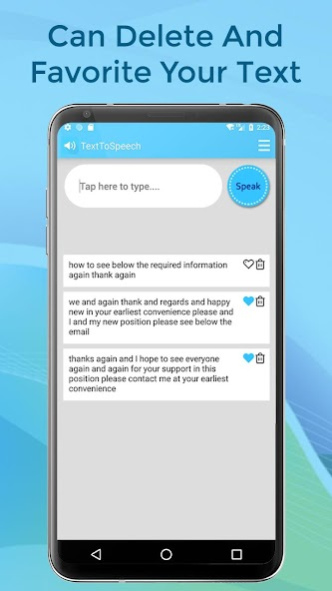

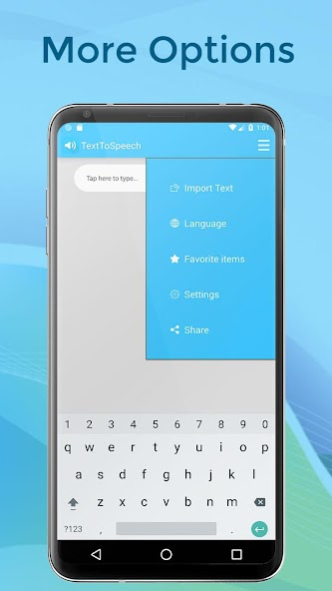
Bring your text to life with Text to Speech (tts,t2s)! Text to speech produces natural sounding synthesised text from the words that you have entered in. With different voices (languages) to choose from and the ability to adjust the rate and pitch, there are countless ways in which the synthesised voice can be adjusted. Text to speech (text to voice) powers applications to read the text on your screen aloud.
Features
-----------------------------
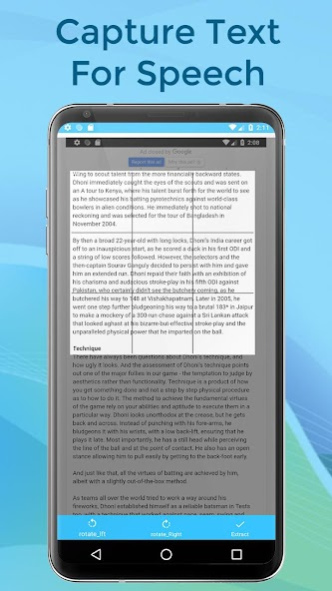
- New functionality added(OCR - Image to text). Now you can extract text from gallery images or camera pictures. then this application will speak that text.
- Different voices (languages) to choose from
- No internet required
- The ability to adjust the pitch and rate
- An auto expanding text field
- Speak as you type
- Highlight spoken text
- Universal app
- Star your favourite phrases
Voices (Languages) Depend on Mobile Support
-------------------------
Arabic (Saudi Arabia) - ar-SA
Chinese (China) - zh-CN
Chinese (Hong Kong SAR China) - zh-HK
Chinese (Taiwan) - zh-TW
Czech (Czech Republic) - cs-CZ
Danish (Denmark) - da-DK
Dutch (Belgium) - nl-BE
Dutch (Netherlands) - nl-NL
English (Australia) - en-AU
English (Ireland) - en-IE
English (South Africa) - en-ZA
English (United Kingdom) - en-GB
English (United States) - en-US
Finnish (Finland) - fi-FI
French (Canada) - fr-CA
French (France) - fr-FR
German (Germany) - de-DE
Greek (Greece) - el-GR
Hebrew (Israel) - he-IL
Hindi (India) - hi-IN
Hungarian (Hungary) - hu-HU
Indonesian (Indonesia) - id-ID
Italian (Italy) - it-IT
Japanese (Japan) - ja-JP
Korean (South Korea) - ko-KR
Norwegian (Norway) - no-NO
Polish (Poland) - pl-PL
Portuguese (Brazil) - pt-BR
Portuguese (Portugal) - pt-PT
Romanian (Romania) - ro-RO
Russian (Russia) - ru-RU
Slovak (Slovakia) - sk-SK
Spanish (Mexico) - es-MX
Spanish (Spain) - es-ES
Swedish (Sweden) - sv-SE
Thai (Thailand) - th-TH
Turkish (Turkey) - tr-TR
Notes
-----------------------------------
- The device must not be set to silent
- More voices are available in system settings
Go Settings -> General -> Accessibility -> Speech -> Voices
Not being able to speak on your own is difficult. Talk For Me & Text to Speech, designed and engineered for a person who lost the ability to speak, seeks to make your life easier. Type in the main text area or tap one of the six main custom buttons and your device will talk for you. Want to set up more custom phrases? Swipe up and up again for more pages with custom editable buttons. Need even more? Save phrases in an archive database. This is great for saving partial sentences. Can you type fast or need to spell a word? Turn on the Auto Speech Function to have every word or letter spoken as you enter it. Together with keyboard shortcuts, predictive text and your custom phrases, this app will allow you to communicate with ease. Listen to the app read aloud or read on screen web pages, news articles, long emails, TXT, PDF, DOC, DOCX, RTF, OpenOffice documents and FB2 ebooks and more. It's an HTML reader, document reader and ebook reader all in one, both for reading on-screen, or listening when your eyes hurt, malfunction or are busy elsewhere. ADHD? Read the User Comment below.
Our app also provide you Text-to-speech Engine that speak out all the texts typed in the box. With All the supported languages. You can save that content for future use. And view them from our app directly.
About Text to Speech
The company that develops Text to Speech is Satsuma. The latest version released by its developer is 1.0.4.
To install Text to Speech on your Android device, just click the green Continue To App button above to start the installation process. The app is listed on our website since 2019-11-25 and was downloaded 0 times. We have already checked if the download link is safe, however for your own protection we recommend that you scan the downloaded app with your antivirus. Your antivirus may detect the Text to Speech as malware as malware if the download link to suma.text.to.speech.texttospeech.texter.voice.texttovoice.tts.t2s is broken.
How to install Text to Speech on your Android device:
- Click on the Continue To App button on our website. This will redirect you to Google Play.
- Once the Text to Speech is shown in the Google Play listing of your Android device, you can start its download and installation. Tap on the Install button located below the search bar and to the right of the app icon.
- A pop-up window with the permissions required by Text to Speech will be shown. Click on Accept to continue the process.
- Text to Speech will be downloaded onto your device, displaying a progress. Once the download completes, the installation will start and you'll get a notification after the installation is finished.
Program Details
System requirements
Download information
Pricing
Version History
version 1.0.4
posted on 2019-11-25
Ads problem are solved.
New Feature are added.
version 1.0.4
posted on 2019-11-26
Ads problem are solved.
New Feature are added.
Disclaimer
Official Google Play Link
We do not host Text to Speech on our servers. We did not scan it for viruses, adware, spyware or other type of malware. This app is hosted by Google and passed their terms and conditions to be listed there. We recommend caution when installing it.
The Google Play link for Text to Speech is provided to you by apps112.com without any warranties, representations or guarantees of any kind, so access it at your own risk.
If you have questions regarding this particular app contact the publisher directly. For questions about the functionalities of apps112.com contact us.
